Keyword Match Types Guide 2026: Complete Google Ads Keyword Match Types Explained
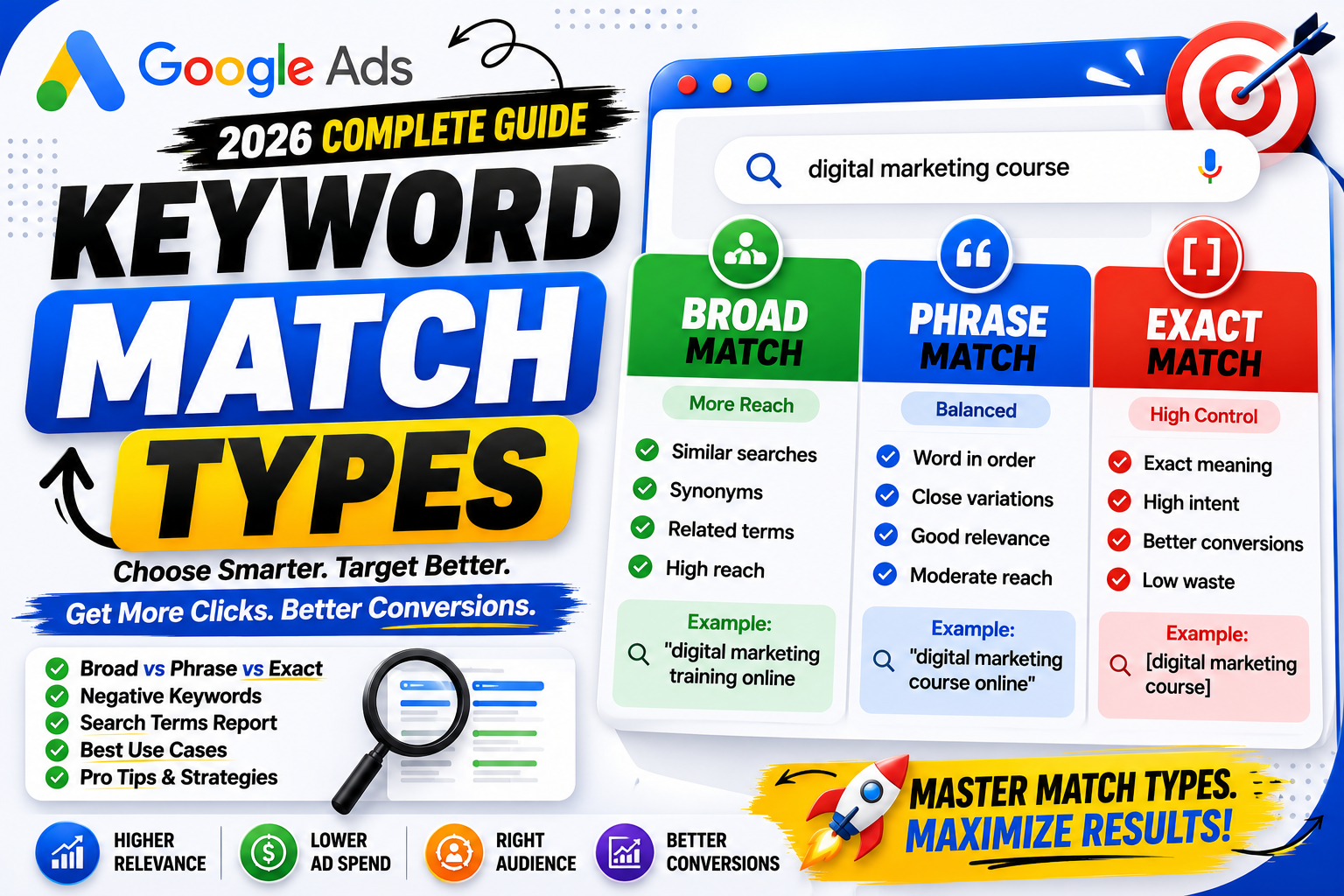
Choosing the right keywords is one of the most important parts of running a successful Google Ads campaign.
However, selecting keywords alone isn't enough.
You also need to decide how closely a user's search query must match your chosen keyword before your ad becomes eligible to appear.
This is where Keyword Match Types come into play.
Keyword Match Types help Google understand how broadly or narrowly your keywords should match user searches. Choosing the wrong match type can lead to irrelevant clicks, wasted budget, or missed opportunities.
In this complete guide, you'll learn what Keyword Match Types are, how they work, the differences between Broad Match, Phrase Match, and Exact Match, when to use each one, negative keywords, best practices, and optimization tips for 2026.
What Are Keyword Match Types?
Keyword Match Types tell Google Ads how closely a user's search must relate to your selected keyword before your ad can be shown.
Instead of showing your ad for every search, Google evaluates the user's query, search intent, and your chosen match type.
Example keyword:
digital marketing course
Depending on the match type, your ad may appear for:
Digital marketing classes
Best online marketing course
Learn digital marketing
Digital marketing institute
Digital marketing course near me
or only for searches with very similar meaning.
Why Are Keyword Match Types Important?
Using the right match type helps you:
Improve traffic quality
Reduce wasted ad spend
Increase conversions
Improve CTR
Increase Quality Score
Better control campaign performance
Without proper match types, Google may show ads for searches that don't align with your business goals.
Types of Keyword Match Types
Google Ads currently supports three primary keyword match types:
Broad Match
Phrase Match
Exact Match
Each offers a different balance between reach and control.
1. Broad Match
Broad Match is the default keyword match type in Google Ads.
Example keyword:
digital marketing course
Your ad may appear for searches such as:
Online marketing classes
Learn SEO
Marketing certification
Internet marketing training
Digital advertising lessons
Google considers:
Synonyms
Related searches
User intent
Recent search activity
Broad Match offers the widest reach.
Advantages of Broad Match
Maximum reach
Discover new search queries
Helpful for campaign expansion
Supports Smart Bidding strategies
Can uncover valuable keyword opportunities
Disadvantages of Broad Match
Less control
Higher chance of irrelevant traffic
Requires regular search term review
Needs strong negative keyword management
When Should You Use Broad Match?
Broad Match works well when:
Launching new campaigns
Exploring new keyword opportunities
Using Smart Bidding
Building large keyword lists
Collecting search query insights
2. Phrase Match
Phrase Match provides a balance between reach and control.
Example:
"digital marketing course"
Your ad can appear for searches like:
Best digital marketing course
Digital marketing course online
Affordable digital marketing course
Digital marketing course near me
Google also considers searches with the same meaning or intent.
Phrase Match is often a practical choice for many advertisers.
Advantages of Phrase Match
Better control than Broad Match
Higher relevance
Improved CTR potential
Easier optimization
Good balance of reach and precision
Disadvantages of Phrase Match
Smaller reach than Broad Match
May still trigger unexpected searches
Requires ongoing monitoring
When Should You Use Phrase Match?
Phrase Match is suitable for:
Most lead generation campaigns
Service businesses
Local businesses
B2B marketing
Agencies
Many advertisers start with Phrase Match while monitoring search term reports.
3. Exact Match
Exact Match provides the greatest level of control.
Example:
[digital marketing course]
Your ad is generally eligible to appear for searches that have the same meaning or intent as your keyword.
Although called "Exact" Match, Google may still match close variants and searches with equivalent intent.
Advantages of Exact Match
Highly relevant traffic
Better control
Higher conversion potential
Less wasted budget
Easier campaign management
Disadvantages of Exact Match
Lower search volume
Limited reach
May require a larger keyword list to capture demand
When Should You Use Exact Match?
Exact Match is ideal for:
High-converting keywords
Mature campaigns
Limited budgets
Local services
High-value products
Brand keywords
Broad Match vs Phrase Match vs Exact Match
| Feature | Broad Match | Phrase Match | Exact Match |
|---|---|---|---|
| Reach | High | Medium | Lower |
| Control | Low | Medium | High |
| Traffic Quality | Moderate | High | Very High |
| Search Volume | High | Medium | Lower |
| Best For | Discovery | Balanced Growth | High Intent |
Understanding Search Intent
Successful keyword selection depends on user intent.
Common intent categories include:
Informational
Example:
What is SEO?
Learn Google Ads
Navigational
Example:
Google Ads Login
Decode With Jai
Commercial
Example:
Best SEO Course
Compare Google Ads Tools
Transactional
Example:
Buy SEO Course
Hire SEO Expert
Transaction-focused campaigns often perform best with carefully selected Phrase and Exact Match keywords.
Negative Keywords
Negative Keywords prevent your ads from appearing for irrelevant searches.
Examples:
free
jobs
internship
PDF
salary
definition
Example:
Keyword:
[digital marketing course]
Negative keyword:
free
Your ad won't appear for:
Free digital marketing course
Negative keywords help improve traffic quality and reduce wasted spend.
Search Terms Report
One of the most valuable optimization tools is the Search Terms Report.
Use it to:
Discover new keywords
Find irrelevant searches
Add negative keywords
Improve match type selection
Increase campaign efficiency
Review this report regularly, especially when using Broad Match.
Match Types for Different Businesses
Local Businesses
Recommended:
Phrase Match
Exact Match
Examples:
Plumber in Delhi
Dentist near me
AC Repair Service
E-commerce Stores
Recommended:
Broad Match (with Smart Bidding)
Phrase Match
Exact Match for top-selling products
Lead Generation
Recommended:
Phrase Match
Exact Match
Examples:
SEO Agency
Web Development Company
Brand Campaigns
Recommended:
Exact Match
Protect brand searches while maintaining high relevance.
Common Mistakes
Avoid these mistakes:
Using only Broad Match
Ignoring negative keywords
Never reviewing Search Terms
Choosing unrelated keywords
Mixing different intents in one ad group
Expecting Exact Match to match only identical wording
Optimizing too quickly without enough data
Best Practices for 2026
Start with clear campaign goals.
Group related keywords into focused ad groups.
Use Phrase Match for balanced performance.
Reserve Exact Match for high-value keywords.
Test Broad Match with Smart Bidding and strong conversion tracking.
Add negative keywords regularly.
Review Search Terms Reports weekly.
Optimize based on conversion data, not clicks alone.
Keyword Match Types Optimization Checklist
✅ Campaign goals defined
✅ Relevant keyword research completed
✅ Match types selected strategically
✅ Negative keywords added
✅ Search Terms reviewed
✅ Ad groups organized
✅ Conversion tracking enabled
✅ Smart Bidding configured (where appropriate)
✅ Performance monitored regularly
Final Thoughts
Keyword Match Types determine how Google connects your keywords with real user searches.
Choosing the right match type isn't about picking the "best" one—it's about selecting the most appropriate option for your campaign objectives.
Broad Match helps discover new opportunities and expand reach.
Phrase Match provides a strong balance between reach and relevance.
Exact Match delivers the highest level of control for valuable keywords.
The most successful Google Ads campaigns often use a combination of all three, supported by strong conversion tracking, smart bidding, and continuous optimization.
Frequently Asked Questions
1. What are Keyword Match Types?
Keyword Match Types tell Google Ads how closely a user's search query must match your chosen keyword before your ad is eligible to appear.
2. What are the three Keyword Match Types?
The three main match types are:
Broad Match
Phrase Match
Exact Match
3. Which Keyword Match Type is best?
There is no single best option. The right choice depends on your campaign goals, budget, and optimization strategy.
4. Does Exact Match mean identical searches only?
No. Google may also match searches with the same meaning or intent, not just identical wording.
5. Why are Negative Keywords important?
Negative Keywords prevent ads from appearing for irrelevant searches, helping improve traffic quality and reduce wasted budget.
6. Should beginners use Broad Match?
Broad Match can be effective when paired with Smart Bidding, conversion tracking, and regular Search Terms reviews. Otherwise, Phrase Match is often a safer starting point.